Why replies get lost
The customer picks the channel, not you. The same person can write through a marketplace, your website form, a text and a letter in one week. Each app shows its own thread and its own red dot. The one you do not open that day is the one with the question.
- Keep one place where every message lands, whatever app it came from.
- Answer where the client wrote: a text gets a text, an email gets an email.
- Once a day, look at who is waiting on you, not at what came in last.
- When a day and a time are agreed in a chat, put the visit in the calendar at once.
How it works in WorkTime CRM
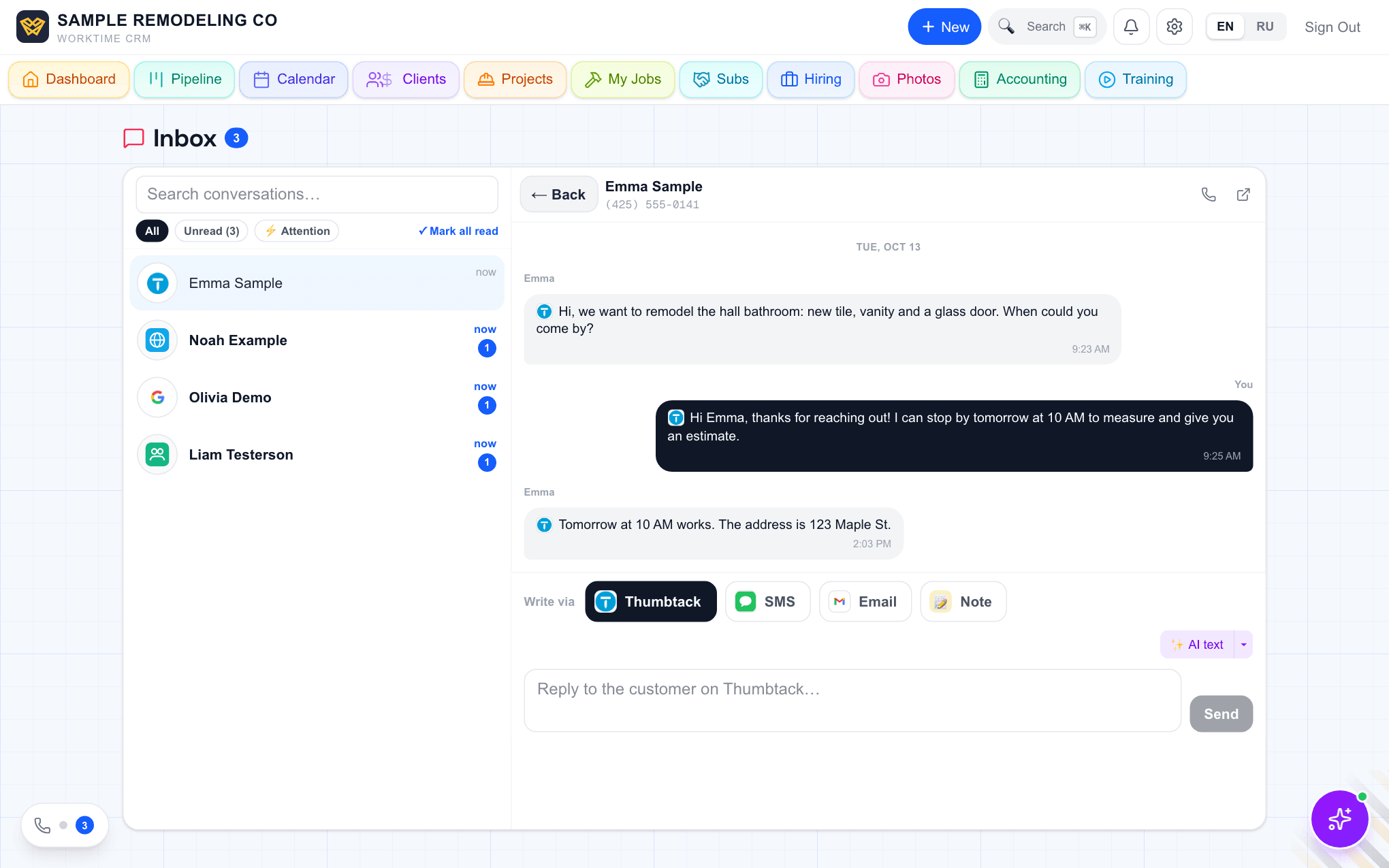
Every conversation lives behind the round phone button in the bottom-left corner of any page, in the Messages tab; the same list opens as a page at Inbox. One row per client, newest activity first, with the logo of where the lead came from. A bold name and a blue number mean something is unread. A small ⚡ means the client is waiting on your move, for example an estimate opened but not signed or a lead nobody has written to for two days; the Attention filter lists only them.
Open a row and the whole history is there in order: texts both ways, the Thumbtack chat, letters and calls. Under the chat sits "Write via": Thumbtack, SMS or Email, so you answer on the channel the client used without opening another app. "✨ AI text" writes a draft from this client's history; you edit and send.
Letters count like texts once your mailbox is connected in Settings → Connections → Email: the mailbox is checked every 10 minutes, and a client who answers by email rises in the list, lights the unread badge and rings the bell, the phone push and Telegram, with a link to the conversation. Every alert is filed under the bell at Notifications; the phone and Telegram alerts are set up in Settings → Connections → Telegram.
When both sides agree on a day and a time in a text, Thumbtack or email conversation, the CRM books the visit on the client's card and in the calendar by itself and tells you.