Guide for contractors

Ten minutes every morning:
who to call first

The job that is lost is rarely lost on site. It is lost in a text nobody answered, an estimate the client never opened, or a visit you forgot to confirm. A short check before you leave the house catches most of it.

By the WorkTime CRM team · Updated October 20, 2026

How it looks in WorkTime CRM · Sample data

Northwest Remodel LLC
Dashboard
Needs attention
🔥 Anna K.opened the estimate 3 times, no reply
Chris P.Invoice #2 · overdue 4 days
Sarah M.new lead · nobody called yet
EarnedThis month
$33,180
12 jobs completed this month
Next 7 daysView all →
Estimate visit — Smith · Kirkland
Tue · 10:00 AM
Work — Anna K. · Master Bath
Wed · 8:00 AM
Follow-up call — John R.
Fri · 2:00 PM
Recent EstimatesView all →
Anna K.
Master bath remodel
$12,900Signed
Chris P.
Kitchen remodel
$21,500Sent
Tom B.
Deck, 320 sq ft
$4,100Draft
The WorkTime CRM dashboard: the next seven days, the newest estimates and what each client did with them, and the clients who need a hand first

Four questions, in this order

Do this before the first ladder. Write the answers on paper if you have to. It takes ten minutes.

  • Where do I have to be today, and at what time? Confirm the first visit with the client.
  • Who wrote to me and has not had an answer yet? Reply first, then everything else.
  • Which estimates did the client not open? A letter that was never opened is not "thinking it over". Text them a short line.
  • Who has an unpaid invoice? One polite message beats a month of silence.

Why this order

A homeowner who asked for a price usually asks two or three people. The one who answers first often gets the visit. A reply costs you a minute; a lead that waited two days is hard to bring back. Money comes last on the list, but it must be on the list.

How it works in WorkTime CRM

Everything above is on the Dashboard. Under the three big tiles, "Next 7 Days" lists your visits and work days. Today's visits whose time has passed turn grey with a green "passed" mark, so you see at once what is still ahead. Each visit shows the client's current stage.

Below it, "Recent Estimates" shows what the client did with each estimate: opened, how many times, or "Not opened" with the days since it was sent. It turns amber after two days and red after five. The Clients list puts first whoever needs a hand: a text nobody answered, an overdue invoice, a missed visit, a lead stuck for over a week.

For the conversations themselves open Inbox: one row per client, with the ⚡ mark on those waiting for your move. For the whole week, open the Calendar.
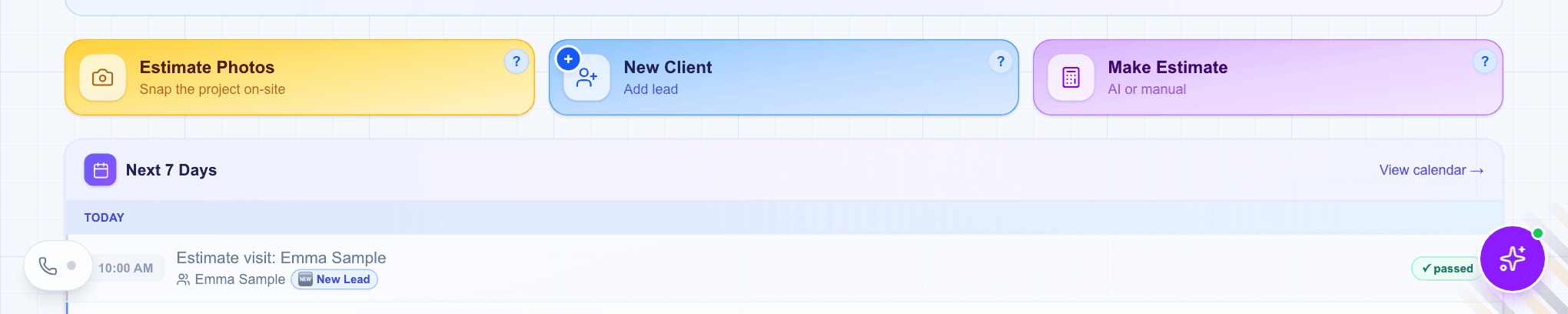
The top of the WorkTime CRM dashboard: Estimate Photos, New Client and Make Estimate tiles, and the Next 7 Days list with today's visit marked passed
The top of the Dashboard: your three starting tiles and the next seven days. Demo company, made-up people.
Questions

How often should I follow up on an estimate?

A short message a couple of days after sending is normal, and one more a few days later. Keep it to one line and make it easy to answer yes or no.

Do I have to use the dashboard to do this?

No. A paper list works if you keep it every day. The CRM only collects the same four answers on one page so you do not have to hunt for them.

What does WorkTime CRM cost?

7 days free with a card on file, then $99 a month per company.

WorkTime CRM — leads, estimates and jobs in one app

Built by a working contractor. 7 days free with a card on file, then $99 a month per company.