Guide for contractors

Get paid faster:
a simple invoice routine for contractors

The work is done and the invoice is still unpaid. Often the client is not refusing. The bill went out late, it was hard to pay, or nobody knows if it was even opened. A few habits fix most of it.

By the WorkTime CRM team ยท Updated October 19, 2026

How it looks in WorkTime CRM ยท Sample data

Northwest Remodel LLC
Clients

A photo or one sentence

Shoot the room on site, or type "master bath, 120 sq ft, full gut"

The AI prices it

Materials, labor and markup at your local rates

Estimate #1042 ยท Anna K.Signed
Tile โ€” floor & walls120 sq ft$2,880
Vanity, install1$1,450
Plumbing fixtures3$960
Total$5,290
๐Ÿ‘ Preview๐Ÿ“ง SendView & Sign
Invoices in WorkTime CRM: what was received, what is outstanding, and which invoice the client has opened

A routine that works with any tool

  • Bill by stages, not at the end. A deposit at signing, a midpoint, a final. Each bill is smaller and tied to work the client can see.
  • Send the first invoice the day the estimate is signed, while the client is still excited.
  • Make paying easy: say exactly how (card, Zelle, check) and where to send it. Every extra question delays the money.
  • Know if the bill was opened. An unopened bill needs a text. An opened, unpaid bill needs a phone call.
  • Nudge politely and early, in writing, before the due date turns into an awkward talk.
  • Write down how each bill was paid. In a year you will need it for your books.

Do not chase a bill the client never saw

Many late payments are just lost emails. Before you call, check that the invoice arrived and was opened. Then your message can be short: "Did you get the invoice for the second stage?"

How it works in WorkTime CRM

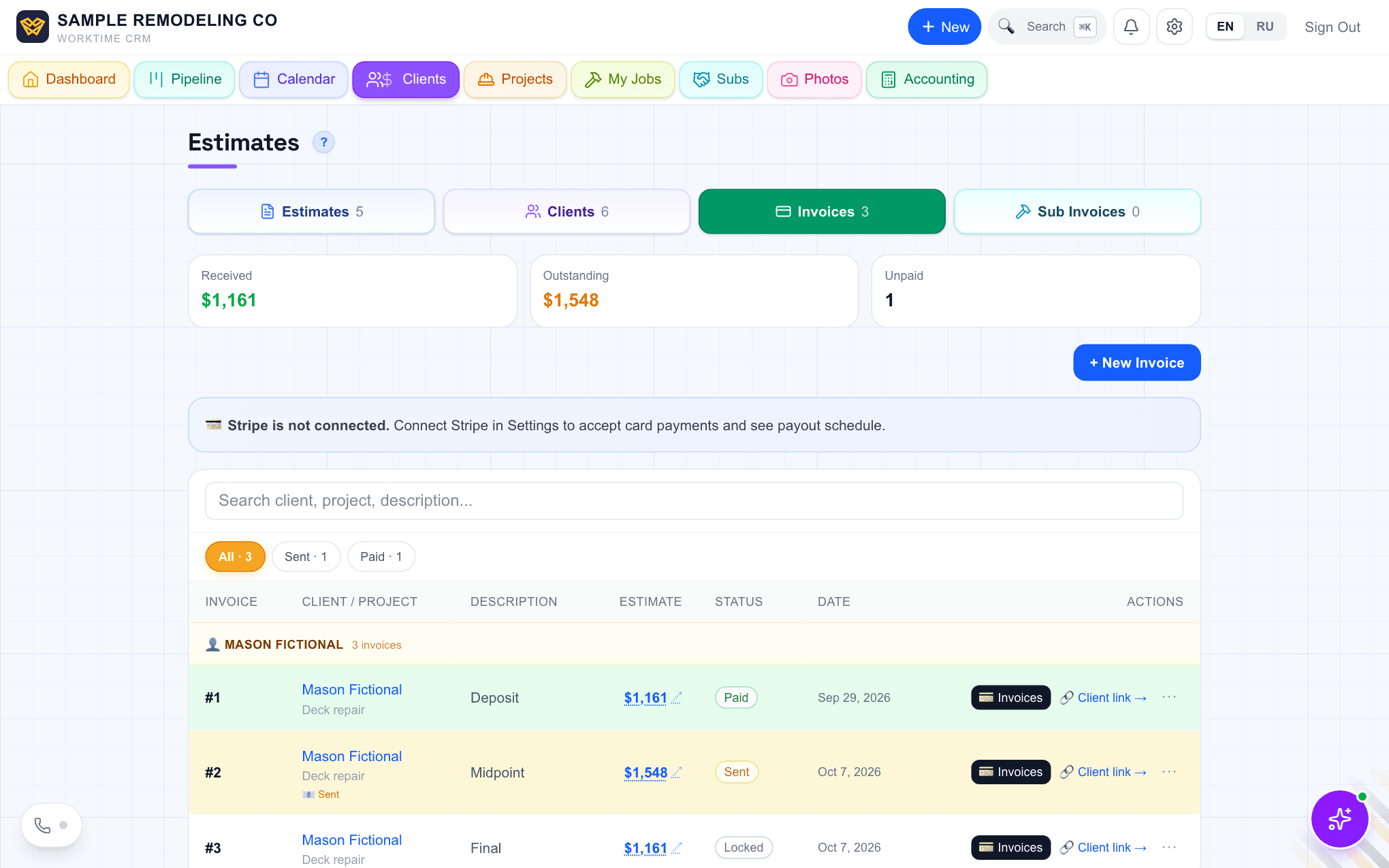
When the client signs an estimate, the invoices are made from its payment plan (50/25/25 unless you set another split). You see them all in the Invoices tab: Draft, Sent, Awaiting Confirmation, Paid. The later ones stay locked until the one before is paid.

Press Send and a ready email opens. You can reword it. The Pay Invoice button, your payment steps and the PDF are added by themselves. Resend opens as a polite reminder.

Each row shows ๐Ÿ“ง Sent and ๐Ÿ‘ Opened with the time, and how many times the client came back. You get an alert when the bill is first opened.

Clients pay by card if you connect Stripe in Settings โ†’ Payments. Without Stripe they pay by Zelle, check or cash and upload proof. Edit what they are told in Invoice Payment Instructions. When the money arrives, press โœ“ Paid and record how it was paid.

The Invoices tab in WorkTime CRM: Received, Outstanding, and one job with deposit paid, midpoint sent and final locked
The Invoices tab: received, outstanding, and each invoice with its status. Demo company, made-up people.
Questions

Can I bill for something that is not in the estimate?

Yes. A one-off invoice (+ New Invoice in the Invoices tab) needs only a client, a description and an amount. It stands alone and never locks anything.

Does the client need an account to pay?

No. The invoice opens from the link in the email. They choose how to pay and follow the steps.

What does it cost?

WorkTime CRM is $99 a month per company, with 7 days free and a card on file. Card payments go through your own Stripe account, and Stripe charges its processing fee.

WorkTime CRM โ€” leads, estimates and jobs in one app

Built by a working contractor. 7 days free with a card on file, then $99 a month per company.