Guide for contractors

Invoice a service call without an estimate

You drive out, fix a leak, charge a callout fee, and leave. Two weeks later you still have not billed it, because writing a full estimate for a one-hour job feels silly. Small jobs are where money quietly goes missing.

By the WorkTime CRM team ยท Updated October 18, 2026

How it looks in WorkTime CRM ยท Sample data

Northwest Remodel LLC
Clients

A photo or one sentence

Shoot the room on site, or type "master bath, 120 sq ft, full gut"

The AI prices it

Materials, labor and markup at your local rates

Estimate #1042 ยท Anna K.Signed
Tile โ€” floor & walls120 sq ft$2,880
Vanity, install1$1,450
Plumbing fixtures3$960
Total$5,290
๐Ÿ‘ Preview๐Ÿ“ง SendView & Sign
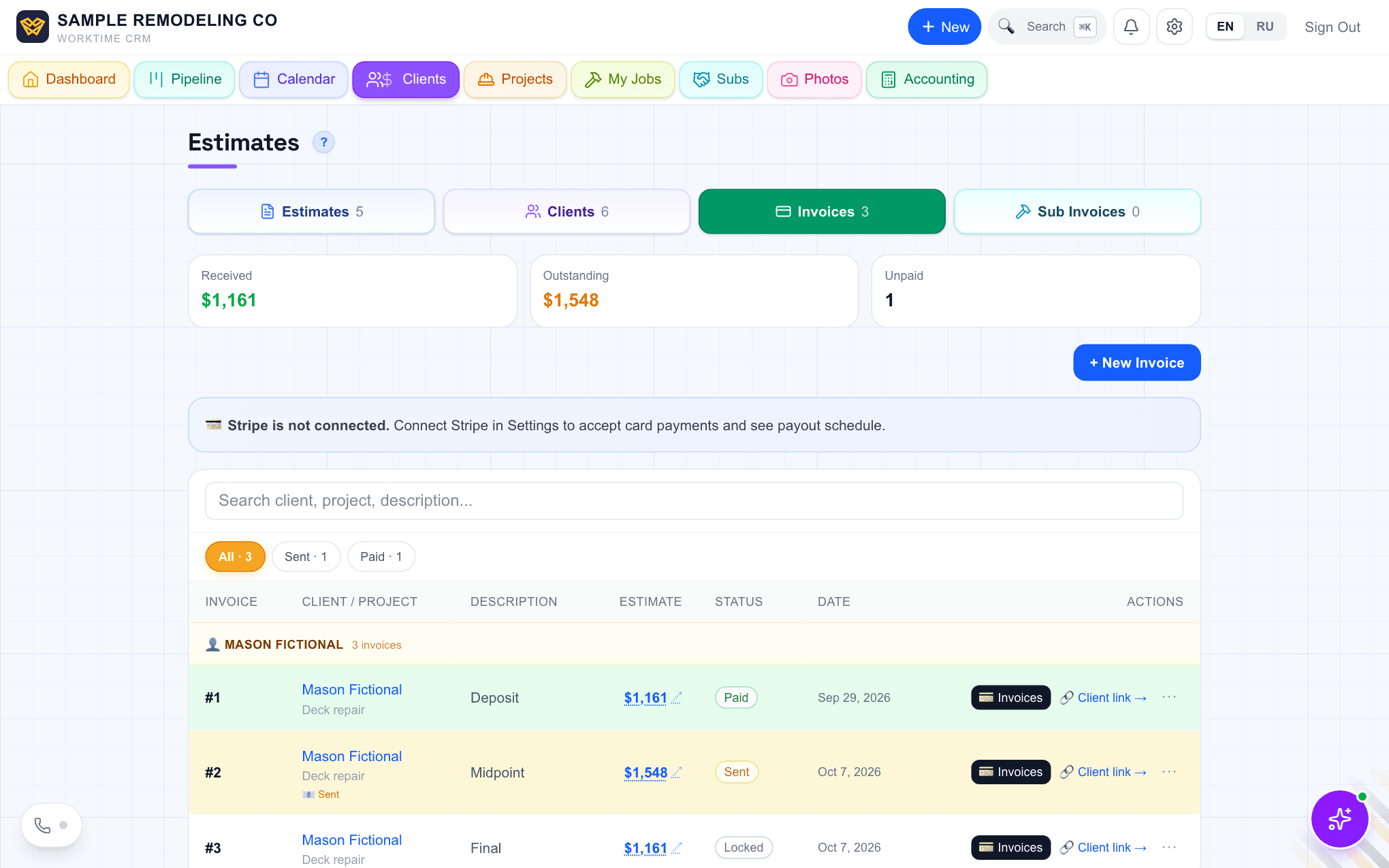
The Invoices list in WorkTime CRM: one-off and project invoices, paid and waiting, in one place

Bill before you leave the driveway

A small job needs only four things on the invoice:

  • The client name and the address of the job.
  • One plain line: what you did.
  • One amount. Callout fee and repair can be one line or two.
  • How to pay, and by when.

Make paying easy, and write down how they paid

Offer more than one way: card, Zelle or a check. The easier it is, the sooner the money comes.

When a check or a Zelle arrives, record three things: the method, the real date, and a reference such as the check number. Months later, when a client says "I already paid that", you can answer in ten seconds.

How it works in WorkTime CRM

Open the Invoices list and press "+ New Invoice". Pick the client, type a description and the amount. A due date is optional. Linking it to one of that client's estimates is optional too: do it if the money should land in that project.

Press "Create Invoice". It appears as a Draft. Press Send on its row: a letter opens already written. Reword it if you like and press "Send invoice". The client gets your letter, the Pay button and a PDF. These invoices are numbered M-1, M-2 and so on, and nothing locks them.

To take cards, connect Stripe in Settings โ†’ Company โ†’ Payments. Without Stripe, clients can still pay by Zelle, check or cash. The "How to pay" block in the letter is yours to edit in Invoice payment instructions.

When the money arrives, press "โœ“ Paid" on the row. Choose Cash, Check, Zelle, Stripe, QuickBooks, Bank transfer or Other, set the real date, and add a reference or a photo of the check if you want. The row then shows the method, for example "Paid ยท Check".

The Invoices tab in WorkTime CRM with the New Invoice button and a list of invoices with their status
The Invoices tab: the "+ New Invoice" button, and every invoice with its status. Demo company, made-up people.
Questions

Do I need an estimate first?

No. A one-off invoice stands on its own. You can link it to an existing estimate if you want the money counted in that project.

Can I take a card payment?

Yes, once you connect Stripe. Without it, clients can still pay by Zelle, check or cash, and you mark the invoice paid yourself.

What does it cost?

Invoices are part of the WorkTime CRM plan: first month free with a card on file, then $99 a month per company.

WorkTime CRM โ€” leads, estimates and jobs in one app

Built by a working contractor. 7 days free with a card on file, then $99 a month per company.