Guide for contractors

Contractor estimates and invoices:
what has to be in them

An estimate is your offer to the customer; an invoice is your request to be paid. Most disputes with customers start not with the quality of the work but with something missing from one of these two papers. Here is what belongs in each, and how to produce them fast.

By the WorkTime CRM team ยท Updated October 7, 2026

How it looks in WorkTime CRM ยท Sample data

Northwest Remodel LLC
Clients

A photo or one sentence

Shoot the room on site, or type "master bath, 120 sq ft, full gut"

The AI prices it

Materials, labor and markup at your local rates

Estimate #1042 ยท Anna K.Signed
Tile โ€” floor & walls120 sq ft$2,880
Vanity, install1$1,450
Plumbing fixtures3$960
Total$5,290
๐Ÿ‘ Preview๐Ÿ“ง SendView & Sign
An estimate in WorkTime CRM: lines, quantities, prices and the signature status

What belongs in an estimate

  • Who you are: company name, phone, license number if you have one.
  • Who the customer is, and the job address.
  • The work line by line: what exactly is done, quantity, unit, price. Not "bathroom remodel" as one line.
  • What is NOT included. This is the most common cause of disputes.
  • The total, tax where it applies, and payment terms: how much at signing, how much during the job, how much at the end.
  • The date until which the price holds.
  • A place for the customer's signature.

Extras during the job โ€” only in writing

Rotten subfloor under the old tile, the wrong wiring behind the wall. Put extra work in a separate document โ€” a change order โ€” with a price and the customer's signature before you do it. "We will sort it out later" almost always ends in an argument.

What belongs in an invoice

  • An invoice number and a date.
  • What it is for: a reference to the signed estimate or the stage of work.
  • The amount due and the due date.
  • How to pay: card, Zelle, check.
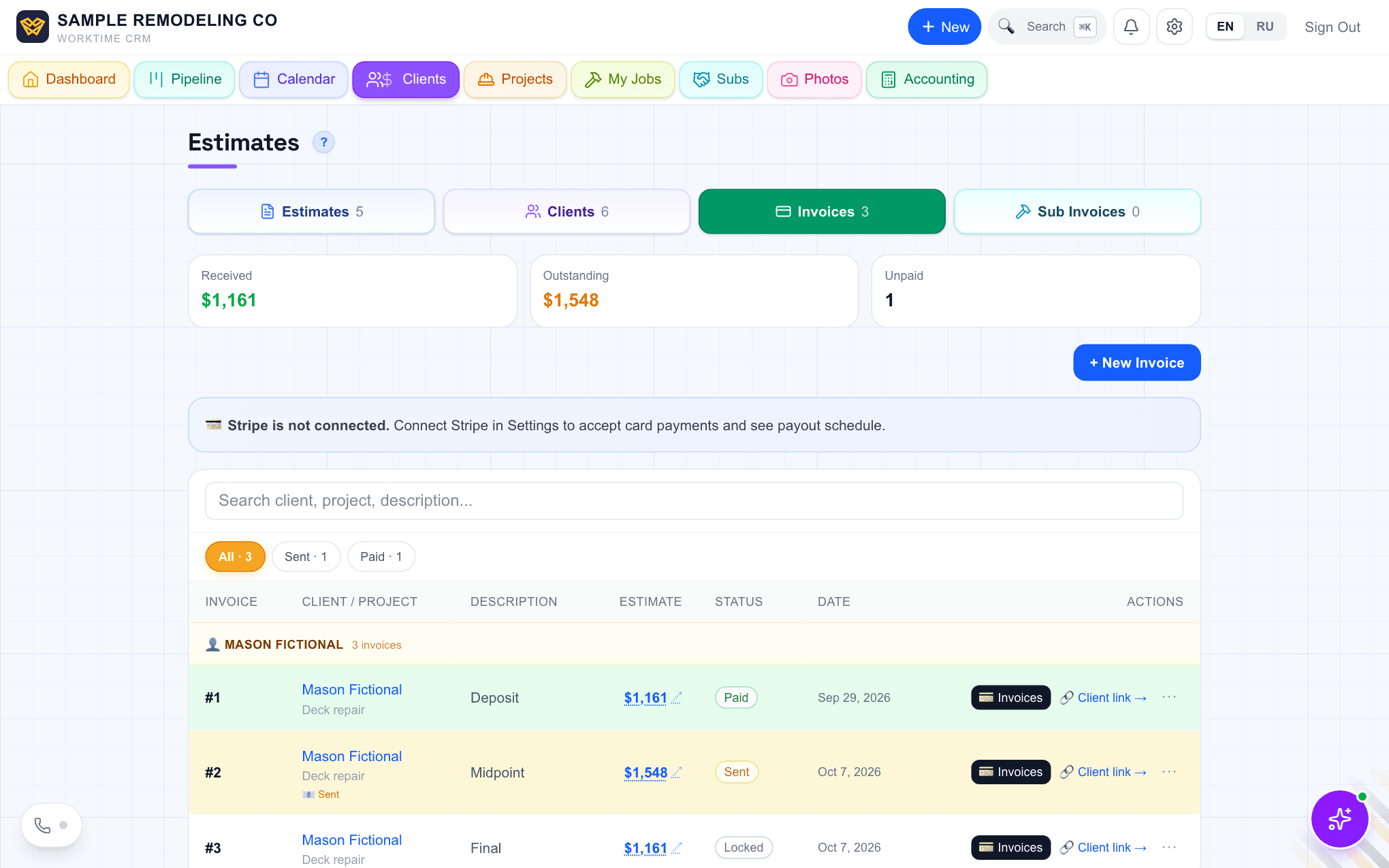
The Invoices tab in WorkTime CRM: deposit paid, midpoint sent, final still locked
One job, three invoices: deposit paid, midpoint sent, final waiting. Demo company, made-up people.

How to do it fast

An estimate sent three days after the visit loses to one that arrived the same evening. The bottleneck is not the visit; it is the evening at the computer.

In WorkTime CRM the AI drafts the estimate from job photos: lines, quantities and prices from your own pricebook. You check it, correct it and send it. The customer opens a link and signs from a phone. Extras are written up as change orders with a signature. The customer pays the invoice by card, or you mark it paid by Zelle or check.
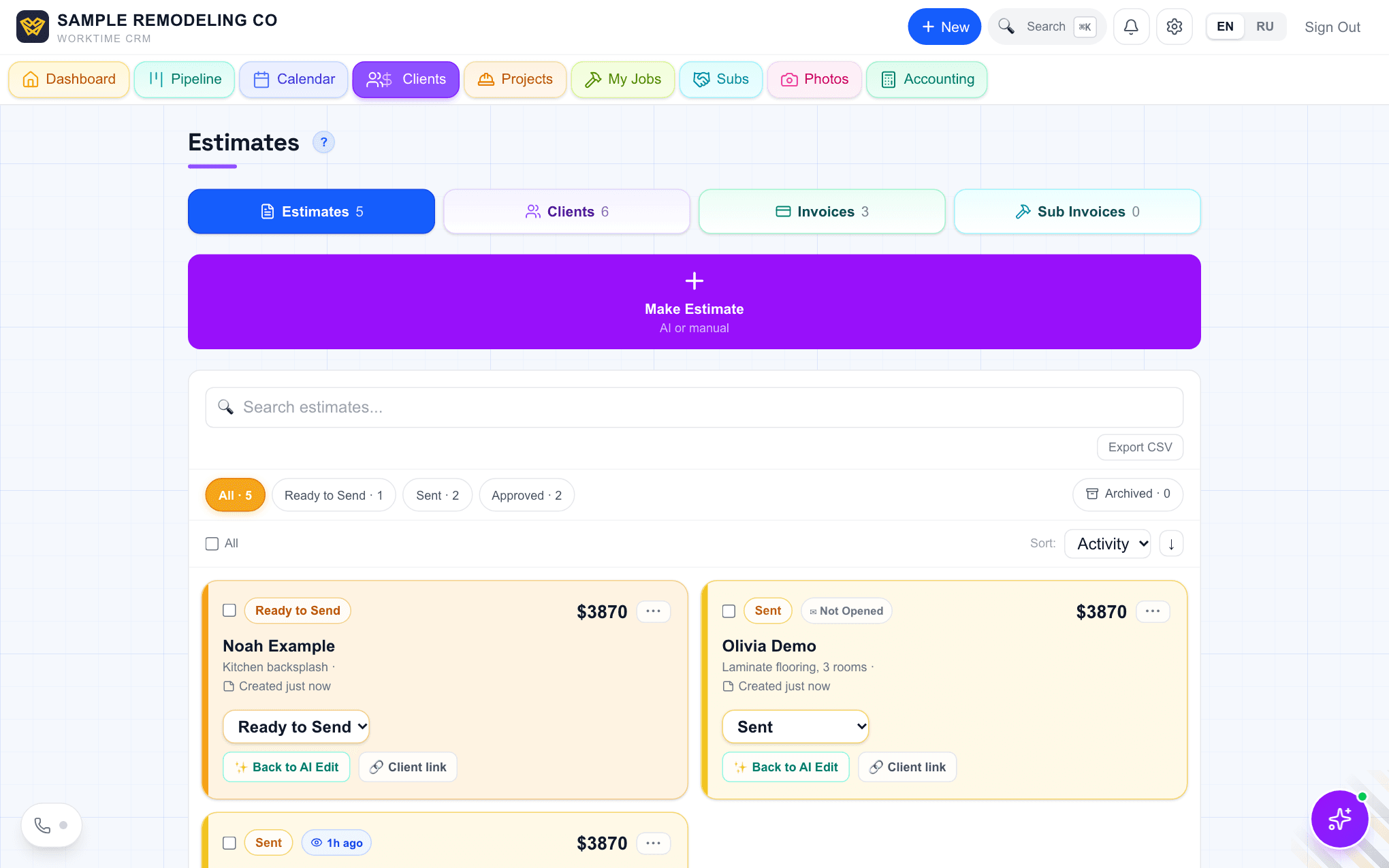
The Estimates list in WorkTime CRM showing which estimates are sent and which were opened
Estimates: what is ready, what is sent, and whether the customer opened it. Demo company, made-up people.
Questions

Is an estimate the same as a contract?

No. A signed estimate fixes the scope and the price. Whether you need a separate contract and what it must say depends on your state and the amount โ€” ask an attorney or your state licensing board.

Can I take a deposit?

Rules on the size of a deposit differ by state. Check yours before you write payment terms into an estimate.

What does WorkTime CRM cost?

$99 a month per company, team members included. First month free with a card on file.

WorkTime CRM โ€” leads, estimates and jobs in one app

Built by a working contractor. First month free with a card on file, then $99 a month per company.