Guide for contractors

How to stop double-booking estimate visits

A homeowner books 10 AM through your site. Another one got 10 AM from you by text yesterday. You find out at 9:45, in the truck. Double-booking costs you one angry client, and often the job.

By the WorkTime CRM team · Updated October 25, 2026

· views Comments · ·

How it looks in WorkTime CRM · Sample data

Northwest Remodel LLC
Calendar
Clients Projects
‹ Sep 8 – 12 ›
MonthWeekDayList
Mon
8
Tue
9
Wed
10
9 AM
Work
Anna K.
Estimate visit
Smith
Work
Anna K.
11 AM
1 PM
Estimate visit
Olga V.
3 PM

Visits booked by the assistant or on your booking page land here by themselves; the green blocks are work days on site. A push on your phone — and Telegram, if you use it — reminds you before each visit.

The Calendar in WorkTime CRM: the week on an hour grid, so overlapping visits and free hours are visible at a glance

Three habits that fix most of it

  • One calendar for everything. If a visit lives in your head, a text thread and a notebook, one of them will lose.
  • Write the real length. A visit at 10 is not 10 to 10:01. Measuring, talking and driving back is often two hours, so the next free time is noon.
  • Close the hours you cannot work. A dentist, a supplier run, a day off: put it on the calendar as busy, or clients will keep booking it.

Look at the week as hours, not as a list

A list of visits hides collisions. A grid with hours shows two blocks sitting on top of each other. Look at it once on Sunday night and once the evening before each day.

How it works in WorkTime CRM

The Calendar is one company calendar. Visits you add by hand, visits from the online booking page and visits the AI assistant books all land on it. The Week view draws each one as a block on an hour grid, and today is tinted with a red line at the current time.

To close hours, press the gear beside the Calendar title and choose "Block time". Pick a date, tick "Whole working day" or set From and Until, and press "Block this time". A "Busy" entry appears, and those hours are no longer offered on your booking page or by the AI assistant.

For one long visit, open the event, press "Edit event details" and set "How long it blocks the calendar". Your usual visit length, working days and how many visits can run at once live in the Visit schedule card.

To see it on your phone, subscribe to the calendar feed from the Calendar settings card.

A visit cancelled by the client should be deleted or moved. The CRM has no "cancelled" mark, so a visit left on the calendar counts as having happened.
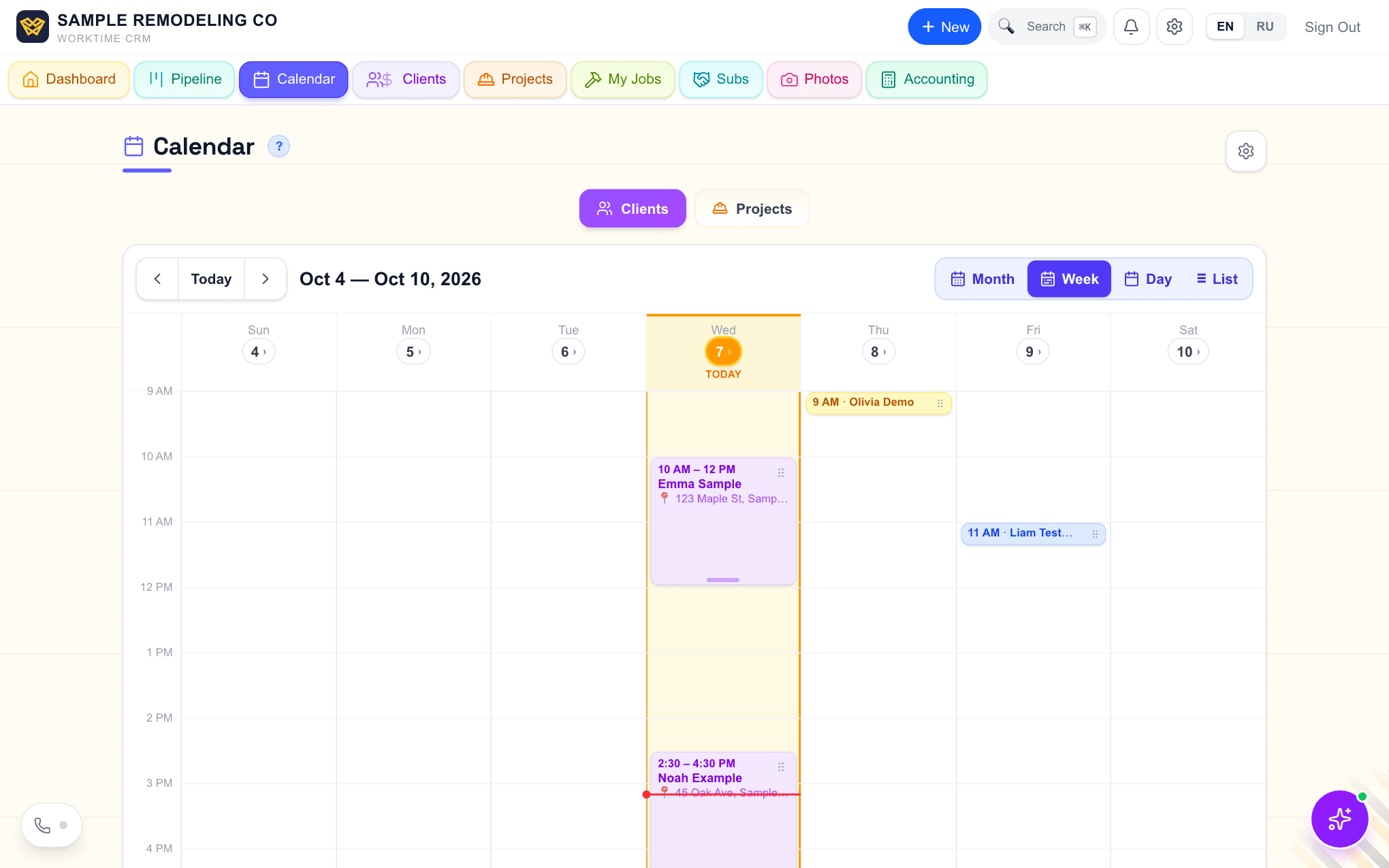
The Calendar in WorkTime CRM in Week view: visits drawn as blocks on an hour grid, today in amber with a red line for the current time
Week view: each visit is a block from its start to its end. Demo company, made-up people.
· views Comments · ·

Comments

Comments are public. Ivan reads every one and answers here.

Questions

Can clients book themselves without double-booking me?

Yes. The booking page offers only the hours that are free, and a booked visit holds its full length in your calendar.

Does the AI phone assistant respect blocked time?

Yes. Blocked hours are not offered by the assistant when a client calls. The assistant runs on your own Twilio and Vapi accounts, which they bill you for.

What does WorkTime CRM cost?

First month free with a card on file, then $99 a month per company.

WorkTime CRM — leads, estimates and jobs in one app

Built by a working contractor. 7 days free with a card on file, then $99 a month per company.